
Hardware solution
One node board, repeated as many times as your playfield needs. Each board drives 4 coils and reads 8 switches, right where they sit.
See the boardWireless node boards · Cloud software · Homebrew pinball
XPF brings together everything a homebrew pinball builder needs: one node board, repeated across the machine and linked by a wireless mesh, software to run your own rules, integrated tools to develop and debug them, and a live simulator that runs straight in your browser.

Everything is designed to work together, so you never have to glue two unrelated systems into one machine.
One node board, repeated as many times as your playfield needs. Each board drives 4 coils and reads 8 switches, right where they sit.
See the boardDrive your pinball with your own rules. Write them as readable code or wire them visually — the engine does the timing for you.
See the rule engineDevelop and debug your rules with a timeline debugger, live signal traces, a precise history of which rule triggered which event, and hot reload.
See the toolsetPlay your machine before a single wire is cut. The simulator runs the real rule engine on a physics playfield, right in your browser.
Open the simulatorHardware
There is only one node board to learn, to stock and to replace. You place as many as your playfield needs, chain them for power, and they talk to each other wirelessly all on their own. One of the boards sits at the centre of the star and runs the rules — and it is exactly the same board as all the others. A separate multimedia node handles sound, light shows and the display.
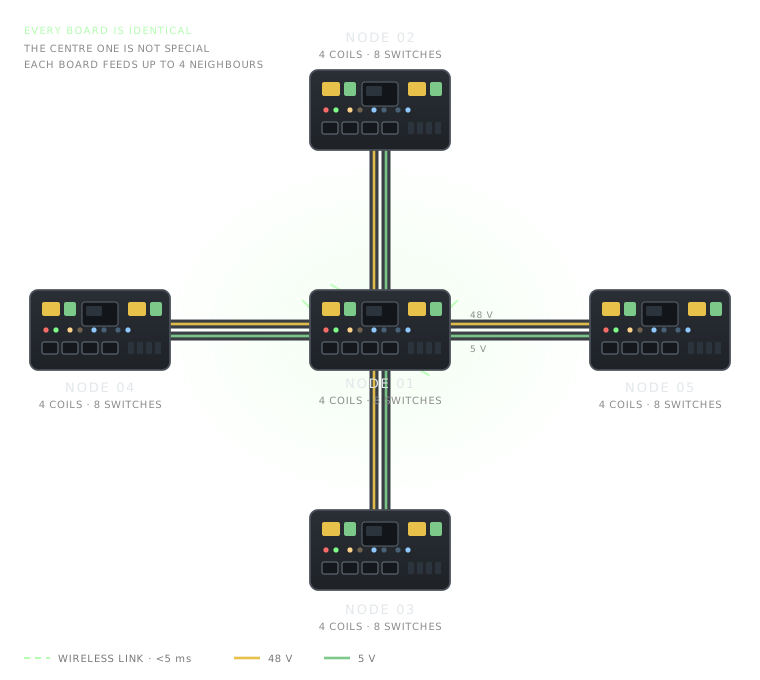
Each mesh node board sits next to the coils and switches it handles. Coil power no longer floods the cabinet: the topology stays clean and easy to wire.
The boards talk to each other over their own Wi-Fi mesh within a 5 ms budget, in a star centred on one of them — there is no separate controller board. Only the 48 V and 5 V rails are daisy-chained from board to board.
Start with two nodes for a simple playfield and grow to a full machine — up to 16 nodes — by plugging in one more board.
Twenty LEDs show power on each link, which coil is actually firing and which switch is closed — before you open any software.
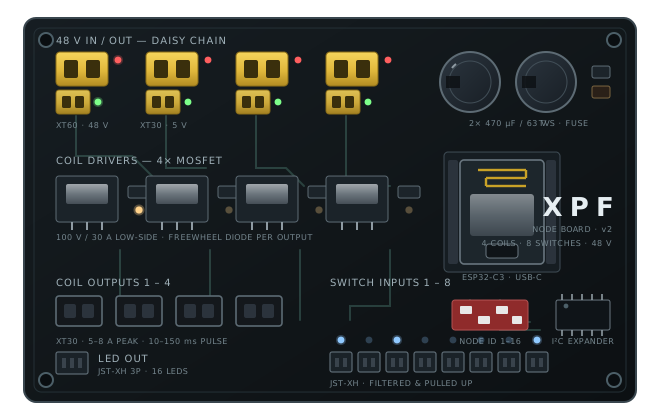
A compact board built around common, easy-to-source parts and standard hobby connectors.
Software
Modes, multiball, jackpots, bonus counting, attract mode: describe what should happen and the engine handles the rest — pulse widths, debouncing, ball tracking and score bookkeeping.
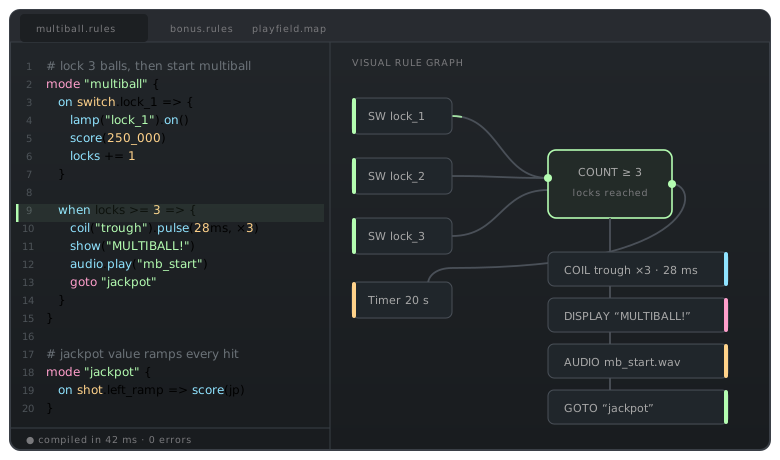
The same rule can be written with AI or wired graphically — both views stay in sync and produce the same machine.
Save a rule file and the running machine picks it up within a few seconds, without restarting the pinball.
Coil pulse limits, thermal budgets and stuck-switch handling are enforced by the engine, not by your rule code.
Sound, display animations and lamp shows are first-class objects you can trigger from any rule.
Author your display without leaving the browser: DMD, LCD and Gottlieb System 1 & 80 formats, text, images, animated images, video and sound, with over thirty ready-made transitions.
Multimedia
Text, images, animated images, video and sound land on a multi-track timeline with a playhead, clips you drag and a live preview of the real display. Build a jackpot animation, an attract loop or a mode intro the same way you would cut a video — then fire it from a rule with a single line.
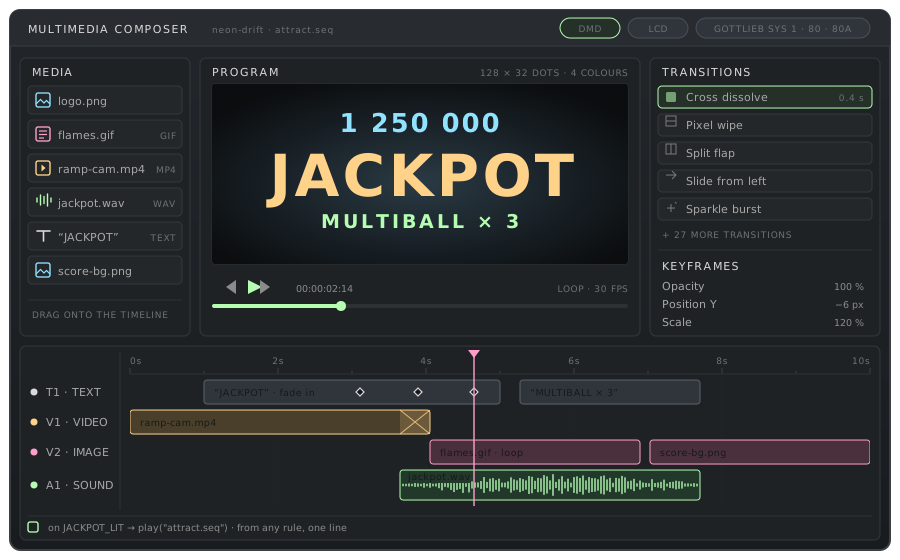
Tracks, clips and a playhead. Drop an asset on the timeline, drag its edges to set the timing, add keyframes for opacity, position or scale, and scrub through the result.
Text, images, animated images, video and sound, layered on as many tracks as you need and synchronised to the frame — a sound effect can land exactly on the flash it belongs to.
Cross dissolve, pixel wipe, split flap, slides, sparkle bursts and more. Drop one between two clips, set its duration, and the engine renders it on the display for you.
The preview monitor shows exactly what the display will show, at its real resolution and colour depth. What you compose in the browser is what the machine plays.
Every sequence is an object your rules can call. The engine takes care of queueing, priority and interrupting a show that is already running.
on JACKPOT_LIT → play("jackpot.seq")
Compose once and target an LCD backbox screen, a dot-matrix display, or the original Gottlieb System 1 and System 80 displays (sys1, 80 and 80A) — the composer knows the format of each one.
Tools
Pinball bugs hide in milliseconds. XPF records every switch, coil and lamp event on the machine so you can scrub back through them and see exactly what your rules did.
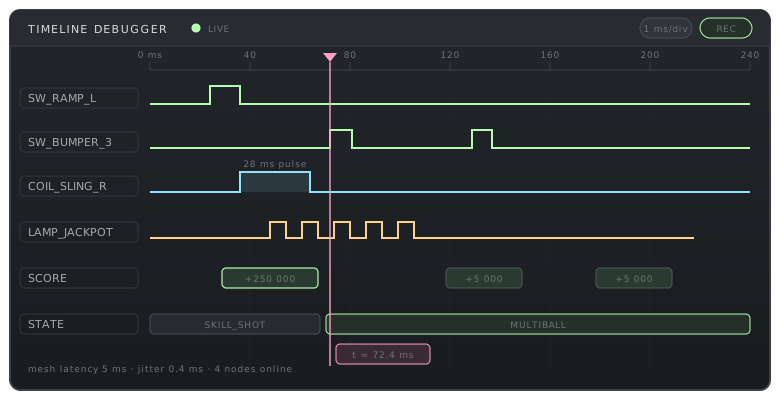
Every signal on one time axis: switch edges, coil pulses, lamp PWM, score events and state transitions.
A precise log of the game: every event, and the exact rule that fired it. Follow a score or a coil pulse back to the shot that caused it.
Coil on-time, switch bounce statistics and node link quality, monitored continuously while you play.
Capture a whole ball on the real machine and replay it against a modified rule set to check what changed.
Describe a shot sequence, state the expected score and mode, and re-run it after every change to your rules.
Compare your playfield map against what the nodes actually report and catch a swapped connector in seconds.
Simulator
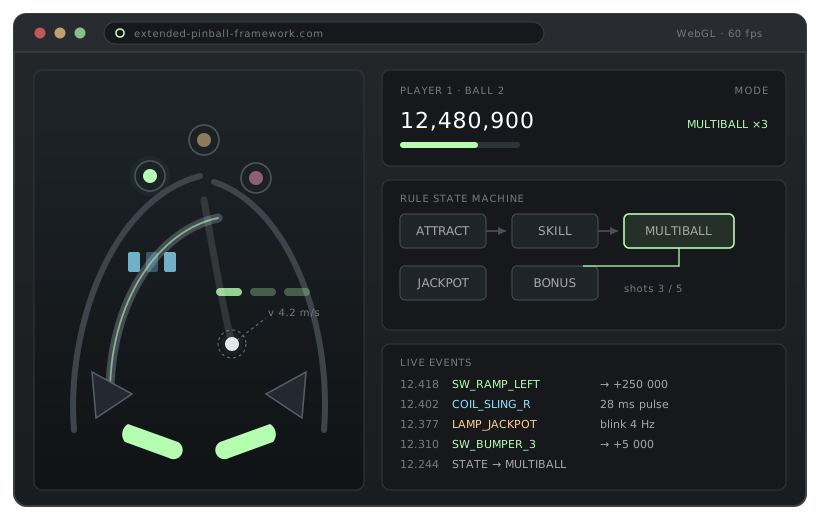
The simulator runs the exact same rule engine as the hardware, on a physics playfield rendered in your browser. Design shots, tune scoring and finish your rules long before the cabinet is built.
Boards & cloud
The node boards are built, tested and sold here. The software runs in the cloud and is free to use — nothing to install, nothing to compile, nothing to maintain on your side.
Assembled, flashed and tested before shipping. Set the node address on the DIP switch, plug in power, and it joins the mesh.
Rule editor, debugger and simulator run in your browser at no cost. Your machines and rule sets stay in your account.
No toolchain, no compiler, no driver. Any recent browser is enough to design, test and drive a machine.
Firmware and cloud updates arrive together, so your boards and your rules always speak the same version.
Assembly guides, safety notes on high-voltage coils, wiring plans and a rule cookbook covering the classic pinball patterns.
Questions about a shot, a coil that misbehaves or a stubborn rule go straight to the people who designed the boards.
Showcase
Three reference designs, from a compact two-node table to a full multi-level cabinet. Playfield files and rule sets come with each one.
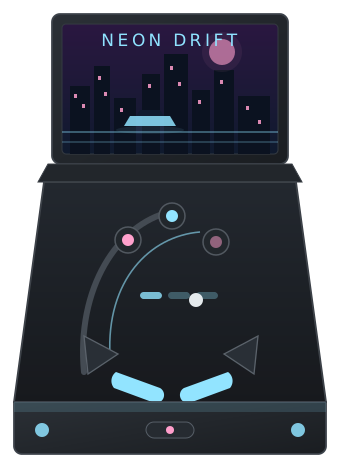
A fast, ramp-heavy table. Four nodes, 3-ball multiball and a chase mode driven entirely by lamp shows.
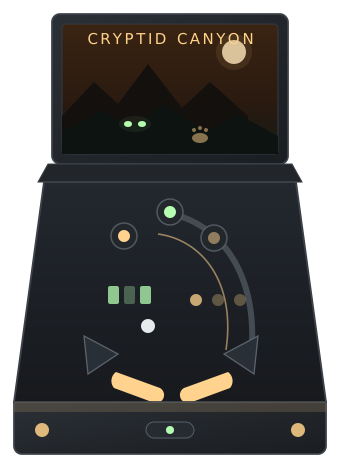
A story machine with a drop-target bank, a hidden lane and a bonus ladder that spans a whole game.
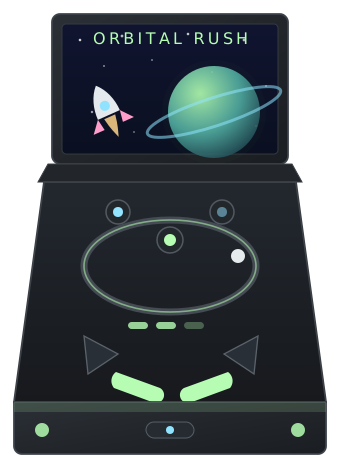
A loop-based design built around one big orbit shot, with a magnet lock and an escalating jackpot.
Get started
You can go through the first three steps tonight, without buying anything.
Place your shots, targets and mechanisms on a template, or import an existing playfield map.
Start from the rule cookbook, then shape your own modes, scoring and multiball logic.
Iterate until the game feels right. Everything you tune here carries over to the hardware unchanged.
Order one node board per group of coils, wire the playfield, and run the wiring checker.
FAQ
The questions homebrew pinball builders ask us most often, about the boards, the rule software and the simulator.
XPF is a complete platform for building a homebrew pinball machine: wireless node boards that drive the coils, switches and lamps on your playfield, plus free cloud software to write your game rules, debug them and play them in a browser simulator. Boards and software are designed together, so there is no integration work left to you.
No. Every board in an XPF machine is the same node board. The wireless star simply starts from one of them, and that board also runs your rules — there is no distinct controller or master unit to buy, stock or replace.
Each node board drives 4 coils, reads 8 switches and controls 16 LEDs, so you add one board per group of playfield mechanisms. A simple table runs on two nodes; a full machine typically uses five or six. XPF supports up to 16 nodes per machine, plus a separate multimedia node for sound, light shows and the display.
Yes. The rule editor, the timeline debugger and the simulator run in the cloud and are free to use — you only pay for the node boards themselves. There is no licence, no subscription and no per-machine fee.
No. XPF is not an open-source project: the boards are designed, built, tested and sold by us, and the software is offered free as a hosted cloud service rather than as source code. Firmware and cloud updates are released together, so your boards and your rules always speak the same version. One commitment we do make: if the XPF project ever stops, all the sources — firmware, cloud software and hardware design — are released publicly.
Yes. The browser simulator runs the exact same rule engine as the hardware on a physics playfield, with virtual nodes that report the same events as real boards. You can sketch a playfield, write your rules and tune your scoring before ordering a single board — and everything you tune carries over to the machine unchanged.
Each node is built around an ESP32-C3 and joins a wireless mesh with a 5 ms latency budget. A board offers 4 coil outputs rated 5–8 A peak, 8 filtered switch inputs on locking JST cables, 16 controllable LEDs and 20 on-board diagnostic LEDs. Power is daisy-chained board to board on 48 V and 5 V rails.
Yes. XPF includes a multimedia composer that works like a video editor: text, images, animated images, video and sound are dropped on a multi-track timeline, cut and keyframed against a live preview of the real display, with more than thirty ready-made transitions. It targets LCD screens, dot-matrix displays and the original Gottlieb System 1 and System 80 displays (sys1, 80 and 80A), and every sequence you compose can be played from a rule with a single line.
No. There is no compiler, driver or toolchain to set up — any recent browser is enough to design a playfield, write rules, debug them and drive a real machine. Boards ship assembled, flashed and tested: set the node address on the DIP switch, plug in power, and the board joins the mesh.
Building your first machine, porting an old cabinet, or running a workshop? Send us a note — we answer every message.
Credits
For the ideas, the testing and the countless hours spent on real machines — XPF would not be what it is without them.